
monthly budget app for four spending pots
Topf Budget
A calmer way to see where your monthly budget goes.
Topf turns a household limit into four clear spending pots for groceries, dining, kids, and mobility — with local bank-file import and a simple view of what remains.
Prepared for iPhone, Android, and web. The first release is local-first, with CSV, XLS, and XLSX bank-file analysis on the device.
Product view
A budget view that tells you where you stand.
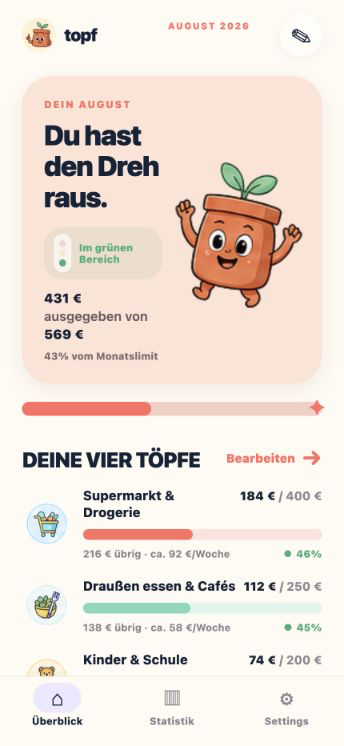
Topf keeps the monthly decision small: see what is used, what is left, and which pot needs your attention before the limit gets tight.
01
See all four pots at a glance
Horizontal progress bars make every category readable in one scan, while the traffic-light state shows whether the month is still comfortable.
02
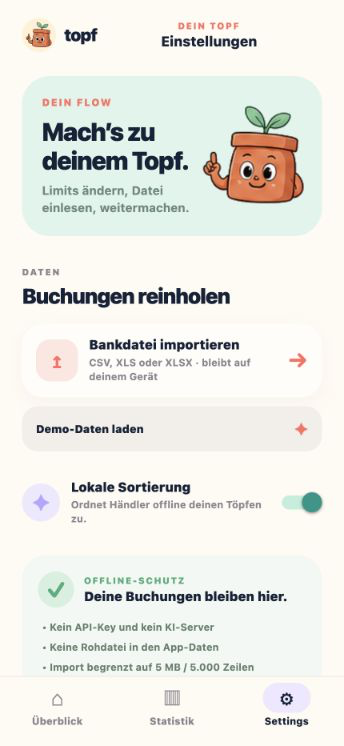
Bring in a bank export privately
Import CSV, XLS, or XLSX files and let the local rules sort common merchants without an account, an upload endpoint, or an online AI request.
03
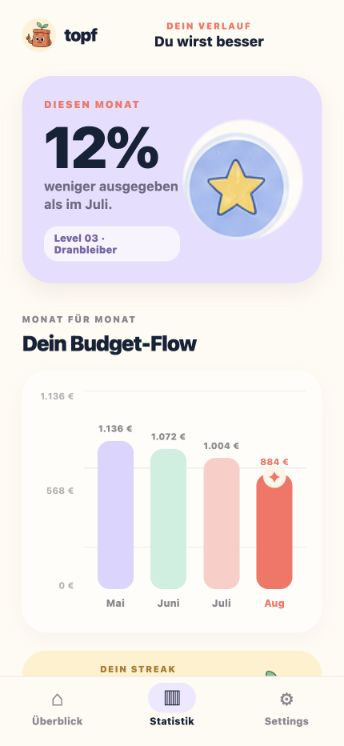
Make progress visible
Month-to-month totals, improvement percentages, levels, and streaks turn a quiet budgeting habit into something you can keep building.
How Topf fits into a month
01
Set your four limits
Choose the monthly amounts for groceries, dining, kids, and mobility, then adjust them whenever your household changes.
02
Import your bank file
Select a CSV, XLS, or XLSX export from your device. Topf reads the first sheet or rows locally and keeps the raw file out of app storage.
03
Use the next clear signal
Check the bars, remaining amount, and weekly orientation to decide where to slow down or where there is still room.
Your bank file stays on your device
Topf is designed around local-first budgeting. It stores limits, aggregated totals, import statistics, a cleaned filename, and a timestamp locally; the raw bank file is not saved in app state or sent to an online AI service.
FAQ
Common questions before you install.
What is Topf Budget?
Topf Budget is a monthly budget app that splits one household limit into four editable pots for groceries, dining, kids, and mobility.
Which bank files can Topf import?
The first release supports CSV, XLS, and XLSX exports. CSV rows and the first sheet of a spreadsheet are analyzed locally on the device.
Does Topf need an account?
No. The current app does not require an account or login for the budgeting and import workflow.
Does Topf send my bank data online?
No. The current release does not upload bank files or send them to an online AI service. The future AI adapter is disabled in this version.
Ready to try Topf Budget?
Topf is prepared for iPhone, Android, and web. The App Store listing will be linked once the release is published.